DicomTreeValidate
- MLModule
genre
author
package
dll
definition
see also
ImageCompare,DicomTreeCompare,DicomTreeInfo,DirectDicomImport,DicomImport,DicomModifyTagsPlugin,ModifyDicomTreeAndImage,DicomModifyMultiFileVolumeExportkeywords
Purpose
DicomTreeValidate provides several checks for issues on connected to an input. It displays validation results, and may optionally posts them in the MeVisLab console.
Important notes:
This module if far from being complete. It can produce false positives (check documentation of specific modes). Best consider its messages as suggestions what to inspect. An absence of reported issues should not be put on the same level with absence of errors in the examined DICOM tree.
DicomTreeValidateshould not be considered as a replacement but at best as an addition for tools such as dciodvfy which is highly recommended for checking DICOM files.This module will be adapted from time to time to reflect better the needs for testing. Therefore it is subject to change, and it is not recommended for use in productive environments.
Currently the following are available:
Unknown non-private tag IDs.
Invalid SOP Class UID values.
Invalid Media Storage SOP UID values.
Invalid or missing Modality tag value.
Values which are larger than the maximum sizes allowed for the corresponding value representations.
Private tags without corresponding private creator (orphaned private tags).
Invalid tag IDs of private creator tags (group ID < 8).
Tag value representations which do not correspond to the DICOM dictionary (may have a few false positives).
Tag value multiplicities which do not correspond to the DICOM dictionary (may have a few false positives).
If further validators are connected to inputValidatorsBase then their reports will be appended to the report of this module.
Windows
Default Panel
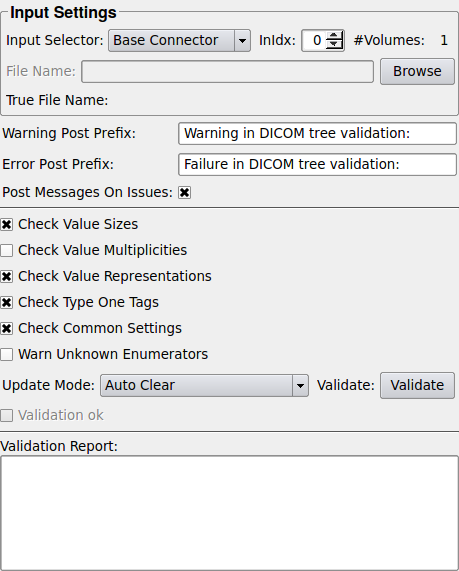
Input Fields
input0
- name: input0, type: Image
This is an image connector which can be used to provide the DICOM trees to be validated; it is is only used if
Input Selectoris set accordingly.
inputBase
- name: inputBase, type: DicomTree/MultiFileVolumeListRefCounted(MLBase)
This is a Base connector which can be used to provide the DICOM tree to be validated; it is only used if
Input Selectoris set accordingly. It supports DICOM tree and MultiFileVolumeList Base objects as inputs.For accessing this object via scripting, see the Scripting Reference:
MLABDicomTree.
inputValidatorsBase
- name: inputValidatorsBase, type: DicomTreeValidationBase(MLBase)
This connector can be used to append additional DICOM tree validators to be used for further checks.
Parameter Fields
Field Index
|
|
|
|
|
|
|
|
|
|
||
|
|
|
|
|
|
|
||
|
|
Visible Fields
File Name
- name: unresolvedFileName, type: String, deprecated name: unresolvedDcmInputFileName
If a loading operation from disk is selected as input in the
Input Selectorthen the file name from which the DICOM tree shall be loaded is specified here. Otherwise this field is insensitive.
True File Name
Input Selector
- name: inputSelector, type: Enum, default: ImageConnector
This field determines from which input the DICOM tree to validate shall be retrieved.
Values:
Title |
Name |
Description |
|---|---|---|
Image Connector |
ImageConnector |
If |
Base Connector |
BaseConnector |
If |
File |
File |
Loads the DICOM tree from the file specified in |
InIdx
- name: inputVolumeIndex, type: Integer, default: 0
If
Input Selectordetermines the Base connector as DICOM tree source and a MultiFileVolumeList with multiple volumes is connected, thenInIdxdetermines the list entry the tree is taken from.
#Volumes
- name: numVolumes, type: Integer, default: 0
Shows the number of available volumes at the DICOM tree source determined by
Input Selector; for image connectors and connected DICOM tree objects this is typically zero or one; for a MultiFileVolumeList it can be an arbitrary number.
Check value sizes
- name: valueSizeCheck, type: Bool, default: TRUE
If enabled then the value(s) size(s) of the tag is checked whether it exceeds the allowed maximum sizes of their value representations as they are defined in the DICOM standard.
Check value multiplicities
- name: valueMultiplicityCheck, type: Bool, default: TRUE
If enabled then the tag value multiplicity is checked - note that this check may produce false positives - therefore its results should be considered only as a hint.
Check value representations
- name: valueRepresentationCheck, type: Bool, default: TRUE
This flag enables the check for correct tag value representations; note that it may create a few false positives.
Check common settings
- name: checkCommonSettings, type: Bool, default: TRUE
Performs further settings, for example for some common tags values. These checks have a small risk of false positives.
Warn unknown enumerators
- name: warnUnknownEnumeratorItems, type: Bool, default: FALSE
If enabled then warnings are generated if enumerator items are found in tag values which are not defined in the DICOM standard. Such warnings do not make the validation fail, but they can be helpful to check for typos or unknown tag values.
Consider empty inputs as error
- name: emptyTreeIsError, type: Bool, default: TRUE
If empty inputs shall be considered as an error then enable this checkbox; otherwise empty inputs are considered as a acceptable and will not cause any messages.
Post Messages On Issues
- name: postMessagesOnIssues, type: Bool, default: TRUE, deprecated name: postErrorIfDifferenceIsFound
If this flag enabled then a failing validation leads to the post of an ML error to the MeVisLab error handler which, for example, can be very useful for tests. If it is disabled then no ML error is posted.
Warning Post Prefix
- name: warningPostPrefix, type: String, default: Warning in DICOM tree validation:
If the flag
Post Messages On Issuesis enabled and validation warnings are generated then this leads to the post of an ML warning to the MeVisLab error handler; the string inWarning Post Prefixwhich be used as introduction for such warning messages. This can be useful to differentiate error and warning messages from different tests and validations.
Error Post Prefix
- name: errorPostPrefix, type: String, default: Error in DICOM tree validation:
If the flag
Post Messages On Issuesis enabled then a failing validation leads to the post of an ML error to the MeVisLab error handler which will have this string as introduction. This can be useful to differentiate error messages from different tests.
Update Mode
- name: updateMode, type: Enum, default: Auto Clear
Controls when a comparison is started.
Values:
Title |
Name |
Deprecated Name |
Description |
|---|---|---|---|
Update |
Auto Update |
Auto Update On Valid Input |
If |
Clear |
Auto Clear |
If |
Validate
- name: validate, type: Trigger
Starts the validation; it is only active if
Update Modeis set to automatic clear.
Validation Report
- name: validationReport, type: String, persistent: no
This field shows a description of all issues which have been found during a validation.
Validation Ok
- name: validationOk, type: Bool, persistent: no
This flag is set to enabled if a validation was performed successfully, otherwise it is disabled.