DicomImportBooleanOperationFilter
- MLModule
genre
author
package
dll
definition
see also
keywords
Purpose
The module DicomImportBooleanOperationFilter allows for combining 1 - 10 DicomImportTagFilter modules or DicomImportBooleanOperationFilter modules with a boolean operator. This is useful if you want to combine several filters before importing image data with the DicomImport module.
Usage
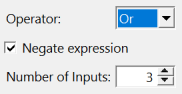
Connect this module to the input slot of a DicomImport module. Choose your operation mode with the drop-down Operator. And and Or operators work on up to 10 input filters.
To negate the result after And/Or operators have been applied, use the checkbox Negate expression.
The number of used inputs can be changed with Number of Inputs.
Windows
Default Panel
Input Fields
inputPlugin0
- name: inputPlugin0, type: DicomImportFilterBase(MLBase)
Connect this to the
DicomImport.outputPluginfield of aDicomImportTagFiltermodule or anotherDicomImportBooleanOperationFilter.
inputPlugin1
- name: inputPlugin1, type: DicomImportFilterBase(MLBase)
Connect this to the
DicomImport.outputPluginfield of aDicomImportTagFiltermodule or anotherDicomImportBooleanOperationFilter.
Output Fields
outputPlugin
- name: outputPlugin, type: DicomImportFilterBase(MLBase)
Connect this to the
DicomImport.inputFilterPluginfield of aDicomImportmodule or anotherDicomImportBooleanOperationFilter.
Parameter Fields
Visible Fields
Operator
- name: boolMode, type: Enum, default: OR
Defines the operation mode.
Values:
Title |
Name |
|---|---|
Or |
OR |
And |
AND |
Negate expression
- name: negateResult, type: Bool, default: FALSE
If checked, the result is negated after all operators have been applied.
Number of Inputs
- name: numberOfInputs, type: Integer, default: 2, minimum: 1, maximum: 10
Sets the number of variables/inputs of the boolean expression.