TensorTransform
- MLModule
genre
authors
package
dll
definition
see also
keywords
DTI,tensor,fiber,tracking,transformation,rotation,registration,orientation,coordinates
Purpose
This module turns the tensor eigenvectors in a tensor image so that the tensors are oriented according to the world coordinate system of the image, and not according to the local image coordinate system.
This is needed by modules like TensorTractography which do fiber tracking in world coordinates. - They don’t do the rotation internally so that the transformation can be cached and used for other purposes, e.g. color-coded visualization.
Usage
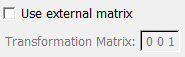
Normally this module detects the needed rotation from the voxel-to-world-matrix of the input image. This can be overwritten by a user-supplied matrix.
Details
This module supports tensor vectors supplied in the u-dimension of an image. The size in the u-dimension must be a multiple of 3 (every 3 values are treated as one directional vector). The output image has the same format as the input image.
Tips
The example network supplied with this module demonstrates why TensorTransform is needed when the tensor image is not aligned with the world coordinate system.
Windows
Default Panel
Input Fields
input0
- name: input0, type: Image
The tensor image.
Output Fields
output0
- name: output0, type: Image
The transformed tensor image.
Parameter Fields
Visible Fields
Use external matrix
- name: useExternalMatrix, type: Bool, default: FALSE
Set this to true if you don’t want to use the voxel-to-world-matrix of the input image but want to supply your own.
Transformation Matrix
- name: transformation, type: Matrix, default: 1 0 0 0, 0 1 0 0, 0 0 1 0, 0 0 0 1
Set this matrix to override the voxel-to-world-matrix of the input image and set useExternalMatrix to true.