FiberBundleQuantification
- MLModule
genre
authors
package
dll
definition
see also
keywords
DTI,Fiber,Tracking,FiberTracking,Filter,Filtering,Cropping,Quantification
Purpose
This module can be used for quantification of fiber bundles corresponding to the paper “Automatic Quantification of DTI Parameters along Fiber Bundles, BVM 2007”. For quantification, the fiberness values stored at each fiber point are used. If the fiberness values have not been modified (e.g., by the module “SetFiberness”), the fiberness values represent the fractional anisotropy (FA) values.
Usage
This module takes one FiberSet and one XMarkerList as input. It is important that the fiber set is the output of the module FiberSetFilter3D after using the crop filter option “include + cut”. The input XMarkerList must be identical to one of the two XMarkerLists which were used as inputs for the filtering. The chosen XMarkerList defines the direction of the quantification, i.e. it defines which end of the fiber bundle is considered as start region.
Tips
This module should only be used in combination with the Module FiberSetFilter3D (see example network).
Windows
Default Panel
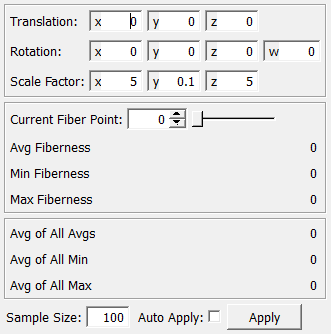
Input Fields
inputFiberSet
- name: inputFiberSet, type: MLBase
The input needs to be a FiberSet which is the result of filter operation of the module FiberSetFilter3D using the the option ?include + cut?
inputXMarkerList_1
- name: inputXMarkerList_1, type: MLBase
The XMarkerList must be identical to one of the two XMarkerLists which were used as inputs for the filtering. The chosen XMarkerList defines the direction of the quantification, i.e. it defines which end of the fiber bundle is considered as start region.
Output Fields
outputFiberSetCenter
- name: outputFiberSetCenter, type: MLBase
This output stores a FiberSet, that consists of only one fiber, which represents the computed center line.
outputDiagramCurves
- name: outputDiagramCurves, type: MLBase
This output is holding a CurveList object containing 3 curves:
curve (green): mean fiberness values (default is FA)
curve (red): indicates the maximum values of the fiberness (default is FA).
curve(blue): minimum values of the fiberness (default is FA)
Note: that these colors come from a Stylepalette which is plugged, as well as the CurveList, into an extDiagram (see example network). They need to be selected in this order.
outputXMarkerList
- name: outputXMarkerList, type: MLBase
This output stores a XMarkerList. The Xmarkers represent all points used for computing the current fiberness values (min,max,avg).
Parameter Fields
Field Index
|
|
|
|
|
|
|
|
|
|
|
|
|
|
|
Visible Fields
Sample Size
- name: sampleSize, type: Integer, default: 100
Defines the number of sample points (measurements points) along the center line.
Translation
- name: translationParameter, type: Vector3, default: 0 0 0
Translation of the plane which indicates the current measurement point.
Scale Factor
- name: scaleFactor, type: Vector3, default: 5 0.1 5
Scale factor of the plane which indicates the current measurement point.
Rotation
- name: rotationParameter, type: Vector4, default: 0 0 0 0
Rotation of the plane which indicates the current measurement point.
Current Fiber Point
- name: currentFiberPoint, type: Integer, default: 0, minimum: 0, maximum: :field:`maxFiberPoint`
Selection of the current measurement point.
Avg Fiberness
- name: avgFA, type: Float, default: 0
Average of all fiberness values for the current measurement point (->currentFiberPoint).
Min Fiberness
- name: minFA, type: Float, default: 0
Minimum of all fiberness values for the current measurement point (->currentFiberPoint).
Max Fiberness
- name: maxFA, type: Float, default: 0
Maximum of all fiberness values for the current measurement point (->currentFiberPoint).
Avg of All Avgs
- name: avgFibernessOfAvg, type: Float, default: 0
Average of all average fiberness values.
Avg of All Min
- name: avgFibernessOfMin, type: Float, default: 0
Average of all minimum fiberness values.
Avg of All Max
- name: avgFibernessOfMax, type: Float, default: 0
Average of all maximum fiberness values.
Apply
- name: applyButton, type: Trigger
Enforce an update of all outputs and parameter values.
Auto Apply
- name: autoApply, type: Bool, default: FALSE
Auto update of all outputs and parameter values.