ModifyCSOVisualizationSettings
Purpose
Modifies particular properties of a CSOVisualizationSettings object.
Usage
Connect a CSOVisualizationSettings object, select the setting you want to modify and press update. Settings will be added on demand.
Tips
See the example network for a typical usage. There, the orientation filter mode is enforced, but all other settings are taken from the input.
If the setting you would like to modify is not included yet, it can be added easily.
Windows
Default Panel
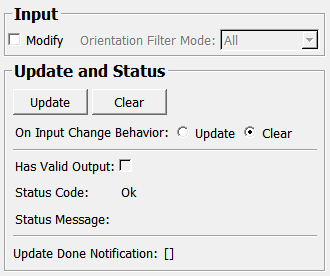
Input Fields
inVisualizationSettings
- name: inVisualizationSettings, type: MLBase
CSOVisualizationSettings to be modified
Output Fields
outVisualizationSettings
- name: outVisualizationSettings, type: MLBase
Modified CSOVisualizationSettings
Parameter Fields
Field Index
|
|
|
|
|
|
|
|
|
|
|
|
|
|
|
Visible Fields
Update
- name: update, type: Trigger
Initiates update of all output field values.
Clear
- name: clear, type: Trigger
Clears all output field values to a clean initial state.
On Input Change Behavior
- name: onInputChangeBehavior, type: Enum, default: Clear, deprecated name: shouldUpdateAutomatically,shouldAutoUpdate
Declares how the module should react if a value of an input field changes.
Values:
Title |
Name |
Deprecated Name |
|---|---|---|
Update |
Update |
TRUE |
Clear |
Clear |
FALSE |
Status Code
- name: statusCode, type: Enum, persistent: no
Reflects module’s status (successful or failed computations) as one of some predefined enumeration values.
Values:
Title |
Name |
|---|---|
Ok |
Ok |
Invalid input object |
Invalid input object |
Invalid input parameter |
Invalid input parameter |
Internal error |
Internal error |
Status Message
- name: statusMessage, type: String, persistent: no
Gives additional, detailed information about status code as human-readable message.
Has Valid Output
- name: hasValidOutput, type: Bool, persistent: no
Indicates validity of output field values (success of computation).
[]
- name: updateDone, type: Trigger, persistent: no
Notifies that an update was performed (Check status interface fields to identify success or failure).
Modify
- name: inModifyOrientationFilterMode, type: Bool, default: FALSE
If true, the
Orientation Filter Modeof the module will overwrite the value from theinVisualizationSettings.
Orientation Filter Mode
- name: inOrientationFilterMode, type: Enum, default: ORIENTATION_MODE_ALL
Defines the filter mode for visibility of CSOs depending on their orientation regarding the current viewer slice.
Values:
Title |
Name |
Description |
|---|---|---|
All |
ORIENTATION_MODE_ALL |
All CSOs are rendered, regardless of their orientation. |
Parallel |
ORIENTATION_MODE_PARALLEL |
Only CSOs parallel to the viewer slice are rendered. |
Non Parallel |
ORIENTATION_MODE_NON_PARALLEL |
Only CSOs that are not parallel to the current viewer slice are rendered. |