CostGraphGenericCostPlugin
- MLModule
author
package
dll
definition
see also
XMarkerListToCostGraph,CostGraphCheapestPath,CostGraphEdgeLengthCostPluginkeywords
Purpose
Plugin for edge cost computation for the XMarkerListToCostGraph module based on simple combination of selectable cost terms resulting from marker properties.
Usage
Connect to a XMarkerListToCostGraph module and adjust the parameters to your needs. There is no update mechanism in this module. The fields are treated like fields of the XMarkerListToCostGraph and trigger an update in that module if its onInputChangeBehavior is set to update.
More complex costs can be modeled using additional instances and connecting them via the inEdgeCostsPlugin fields.
Tips
You should not deactivate filtering for large XMarkerLists as the resulting cost graph would have to many edges.
This plugin has a certain overhead due to all its options. It should be mainly used for prototyping. If you determined a suited cost term or a combination of multiple terms, you should implement your own, problem specific plugin.
Windows
Default Panel
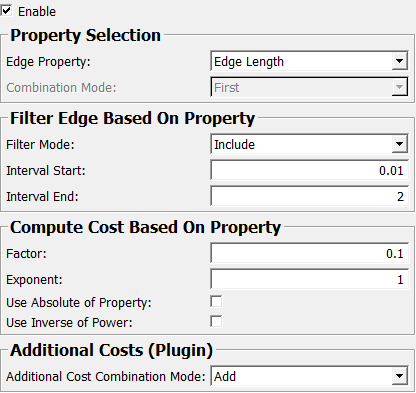
Input Fields
inEdgeCostsPlugin
- name: inEdgeCostsPlugin, type: MLBase
Costs plugin module to compute additional costs.
Output Fields
outEdgeCostsPlugin
- name: outEdgeCostsPlugin, type: MLBase
This connector just carries the plugin itself.
Parameter Fields
Field Index
|
|
|
|
|
|
|
|
|
|
|
|
|
|
|
Visible Fields
Enable
- name: enable, type: Bool, default: TRUE
Enables this plugin. If disabled, plugins connected to costPlugin are still evaluated.
Edge Property
- name: edgeProperty, type: Enum, default: Edge Length
Defines which edge property is the basis for filtering and cost computation. Each candidate edge contains two points and two vectors associated with these points. The edge is defined as the vector pointing from the first point to the second point.
Values:
Title |
Name |
Description |
|---|---|---|
Edge Length |
Edge Length |
The length of an edge is used as the basis for cost computation. |
Vector Length |
Vector Length |
The lengths of the vectors are used as the basis for cost computation. |
Vector X |
Vector X |
The x-components of the two vectors are used as the basis for cost computation. |
Vector Y |
Vector Y |
The y-components of the two vectors are used as the basis for cost computation. |
Vector Z |
Vector Z |
The z-components of the two vectors are used as the basis for cost computation. |
Vector dot Edge |
Vector dot Edge |
The dot products between the two vectors and the edge are used as the basis for cost computation. |
Vector dot Edge Normalized |
Vector dot Edge Normalized |
The dot products between the two normalized vectors and the normalized edge are used as the basis for cost computation. |
Vector dot Vector |
Vector dot Vector |
The dot product between the two vectors is used as the basis for cost computation. |
Vector dot Vector Normalized |
Vector dot Vector Normalized |
The dot product between the two normalized vectors is used as the basis for cost computation. |
Marker Type |
Marker Type |
The marker types are used as the basis for cost computation. |
Combination Mode
- name: edgePropertyCombinationMode, type: Enum, default: First
If there are more than one of the selected properties (e.g.
Edge Propertyis VectorLength, VectorDotEdge), this defines how to select from them or how to combine them.
Values:
Title |
Name |
Description |
|---|---|---|
First |
First |
The first of the two is used as the basis for cost computation. |
Second |
Second |
The second of the two is used as the basis for cost computation. |
Min |
Min |
The smaller of the two is used as the basis for cost computation. |
Max |
Max |
The larger of the two is used as the basis for cost computation. |
Average |
Average |
The average of the two is used as the basis for cost computation. |
Multiply |
Multiply |
The product of the two is used as the basis for cost computation. |
First / Second |
First / Second |
The first divided by the second is used as the basis for cost computation. |
Second / First |
Second / First |
The second divided by the first is used as the basis for cost computation. |
Max / Min |
Max / Min |
The larger divided by the smaller is used as the basis for cost computation. |
Min / Max |
Min / Max |
The smaller divided by the larger is used as the basis for cost computation. |
Filter Mode
- name: filterMode, type: Enum, default: Include
Defines if and how edges are filtered based on the selected (and combined) edge property.
Values:
Title |
Name |
Description |
|---|---|---|
Include |
Include |
Edges are only used if the selected property is within the defined interval. |
Exclude |
Exclude |
Edges are only used if the selected property is outside the defined interval. |
None |
None |
All edges are used. |
Interval Start
- name: filterIntervalStart, type: Double, default: 0
Defines the start of the filtering interval.
Interval End
- name: filterIntervalEnd, type: Double, default: 0
Defines the end of the filtering interval.
Use Absolute of Property
- name: costAbsolute, type: Bool, default: FALSE
If true, the absolute of the property is used for cost computation.
Use Inverse of Power
- name: costInverse, type: Bool, default: FALSE
If true, the inverse of the power is used in the cost computation.
Exponent
- name: costExponent, type: Double, default: 2
Exponent for the cost computation.
Factor
- name: costFactor, type: Double, default: 1
Factor for the cost computation.
Additional Cost Combination Mode
- name: additionalCostCombinationMode, type: Enum, default: None
Defines if and how additional costs (from a connected plugin) are used.
Values:
Title |
Name |
Description |
|---|---|---|
None |
None |
No additional costs are used. |
Multiply |
Multiply |
Additional costs are multiplied with the costs of this module. |
Divide |
Divide |
The costs of this module are divided by the additional costs. If the additional costs are 0, the edge is rejected. |
Add |
Add |
Additional costs are added to the costs of this module. |
Subtract |
Subtract |
Additional costs are subtracted from the costs of this module. |